Reduce desk cabling
Connect a supported phone to an approved wireless network when Ethernet is impractical.

Not sure what you need?
Read our complete guide.

Not sure what you need?
Read our complete guide.
RRP $69.00
30% OFF
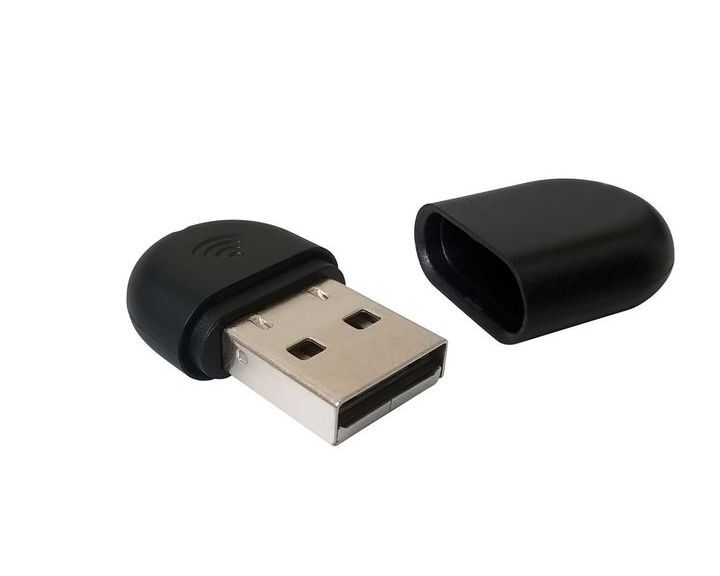

Yealink • SKU wf40
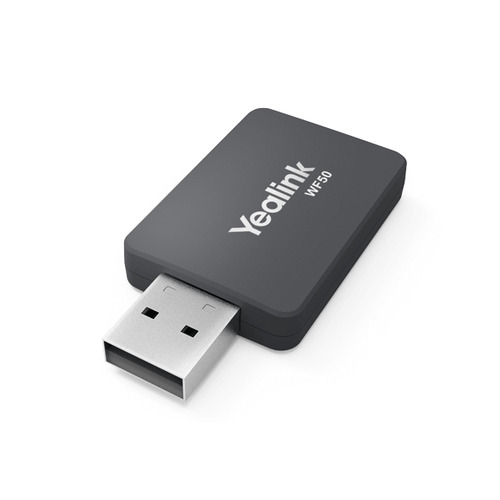
A compact plug-and-play 2.4GHz Wi-Fi adapter for specifically supported Yealink IP phones, with up to 150 Mbps wireless connectivity.
The Yealink WF40 adds 2.4GHz 802.11b/g/n Wi-Fi connectivity to compatible Yealink IP phones. It is a low-power USB accessory rated for transmission up to 150 Mbps. Official compatibility includes selected legacy and current T2, T4 and T5 series phones, but required firmware differs by model. The adapter does not make every Yealink phone wireless and should only be ordered after checking the exact host phone and firmware.
Quick answer: Choose WF40 for an approved Yealink phone that only needs 2.4GHz Wi-Fi. Choose WF50 where a confirmed compatible phone and network require dual-band 2.4/5GHz connectivity.
Connect a supported phone to an approved wireless network when Ethernet is impractical.
Use the compact plug-and-play form factor on a compatible Yealink host.
Add up to 150 Mbps connectivity without paying for unneeded 5GHz capability.
A quick fit check for Australian businesses comparing equipment for users, rooms, sites or wider projects.
| Exact model | Yealink WF40 |
|---|---|
| Product type | Wi-Fi USB dongle |
| Band | 2.4GHz |
| Standards | IEEE 802.11b/g/n |
| Maximum rate | Up to 150 Mbps |
| Host | Selected Yealink T2/T4/T5 phones |
| Firmware | Model-dependent minimum version |
No. WF40 is a 2.4GHz 802.11b/g/n adapter. Use a compatible WF50 for dual-band requirements.
Yealink rates WF40 for transmission up to 150 Mbps.
No. It supports only listed models and some require specific firmware versions.
No. WF40 provides Wi-Fi connectivity only; the host phone still needs its approved power method.
Compatibility should not be assumed. Confirm the exact Yealink model, firmware, SIP platform, network, power and accessory requirements before ordering.
This DigiPhone listing is presented as an Australian version with the applicable manufacturer warranty in Australia and Australian Consumer Law protections.
Yes. Contact DigiPhone with SKU wf40, site and user quantities, target phone platform and required coverage for compatibility and project support.
Add wireless connectivity without a bulky external bridge.
Connect to supported 802.11b/g/n business Wi-Fi networks.
Provide sufficient rated throughput for supported phone functions.
Use a purpose-built Yealink phone accessory.
Extend selected T2, T4 and T5 models where firmware requirements are met.
Simplify deployment on an approved host phone.
Best for: compatible Yealink IP phones that need a verified 2.4GHz Wi-Fi connection instead of wired Ethernet.
| DigiPhone SKU | wf40 |
|---|---|
| Product type | Wi-Fi USB dongle |
| Frequency | 2.4GHz |
| Wireless standards | IEEE 802.11b/g/n |
| Transmission rate | Up to 150 Mbps |
| Deployment | Plug-and-play on supported phones |
| Compatibility | Selected SIP-T27G/T29G/T41S/T42S/T46S/T48S/T42U/T43U/T46U/T48U/T52S/T54S/T53 models |
| Firmware | Minimum version varies by host phone |
| Manufacturer warranty | Yealink manufacturer warranty in Australia; duration not supplied |
Compatibility note: Confirm exact host phone, minimum firmware, USB support, 2.4GHz coverage, wireless security and voice QoS before ordering.
| SKU | wf40 |
| Barcode # | 6938818300828 |
| Brand | YEALINK |
| Shipping Weight | 0.4000kg |
This DigiPhone listing is supplied as an Australian version and is covered by the Yealink manufacturer warranty in Australia; the duration and service conditions were not stated in the supplied DigiPhone record and should be confirmed for this exact product. Warranty service is subject to the manufacturers terms and proof-of-purchase requirements.
Your rights under this warranty are in addition to rights available under the Australian Consumer Law. Keep your DigiPhone invoice and product serial number for any claim.
Bulk and project support: For fleet deployments, spare units or warranty planning, contact DigiPhone with the SKU and required quantity.
Yealink • SKU wf40
A compact plug-and-play 2.4GHz Wi-Fi adapter for specifically supported Yealink IP phones, with up to 150 Mbps wireless connectivity.
The Yealink WF40 adds 2.4GHz 802.11b/g/n Wi-Fi connectivity to compatible Yealink IP phones. It is a low-power USB accessory rated for transmission up to 150 Mbps. Official compatibility includes selected legacy and current T2, T4 and T5 series phones, but required firmware differs by model. The adapter does not make every Yealink phone wireless and should only be ordered after checking the exact host phone and firmware.
Quick answer: Choose WF40 for an approved Yealink phone that only needs 2.4GHz Wi-Fi. Choose WF50 where a confirmed compatible phone and network require dual-band 2.4/5GHz connectivity.
Connect a supported phone to an approved wireless network when Ethernet is impractical.
Use the compact plug-and-play form factor on a compatible Yealink host.
Add up to 150 Mbps connectivity without paying for unneeded 5GHz capability.
A quick fit check for Australian businesses comparing equipment for users, rooms, sites or wider projects.
| Exact model | Yealink WF40 |
|---|---|
| Product type | Wi-Fi USB dongle |
| Band | 2.4GHz |
| Standards | IEEE 802.11b/g/n |
| Maximum rate | Up to 150 Mbps |
| Host | Selected Yealink T2/T4/T5 phones |
| Firmware | Model-dependent minimum version |
No. WF40 is a 2.4GHz 802.11b/g/n adapter. Use a compatible WF50 for dual-band requirements.
Yealink rates WF40 for transmission up to 150 Mbps.
No. It supports only listed models and some require specific firmware versions.
No. WF40 provides Wi-Fi connectivity only; the host phone still needs its approved power method.
Compatibility should not be assumed. Confirm the exact Yealink model, firmware, SIP platform, network, power and accessory requirements before ordering.
This DigiPhone listing is presented as an Australian version with the applicable manufacturer warranty in Australia and Australian Consumer Law protections.
Yes. Contact DigiPhone with SKU wf40, site and user quantities, target phone platform and required coverage for compatibility and project support.
This DigiPhone listing is supplied as an Australian version and is covered by the Yealink manufacturer warranty in Australia; the duration and service conditions were not stated in the supplied DigiPhone record and should be confirmed for this exact product. Warranty service is subject to the manufacturers terms and proof-of-purchase requirements.
Your rights under this warranty are in addition to rights available under the Australian Consumer Law. Keep your DigiPhone invoice and product serial number for any claim.
Bulk and project support: For fleet deployments, spare units or warranty planning, contact DigiPhone with the SKU and required quantity.
Add wireless connectivity without a bulky external bridge.
Connect to supported 802.11b/g/n business Wi-Fi networks.
Provide sufficient rated throughput for supported phone functions.
Use a purpose-built Yealink phone accessory.
Extend selected T2, T4 and T5 models where firmware requirements are met.
Simplify deployment on an approved host phone.
Best for: compatible Yealink IP phones that need a verified 2.4GHz Wi-Fi connection instead of wired Ethernet.
| DigiPhone SKU | wf40 |
|---|---|
| Product type | Wi-Fi USB dongle |
| Frequency | 2.4GHz |
| Wireless standards | IEEE 802.11b/g/n |
| Transmission rate | Up to 150 Mbps |
| Deployment | Plug-and-play on supported phones |
| Compatibility | Selected SIP-T27G/T29G/T41S/T42S/T46S/T48S/T42U/T43U/T46U/T48U/T52S/T54S/T53 models |
| Firmware | Minimum version varies by host phone |
| Manufacturer warranty | Yealink manufacturer warranty in Australia; duration not supplied |
Compatibility note: Confirm exact host phone, minimum firmware, USB support, 2.4GHz coverage, wireless security and voice QoS before ordering.
| SKU | wf40 |
| Barcode # | 6938818300828 |
| Brand | YEALINK |
| Shipping Weight | 0.4000kg |
Copyright © 2026 DiGi Phone.
ABN: 49 168 373 519
Welcome to our website. If you continue to browse and use this website, you are agreeing to comply with and be bound by the following terms and conditions of use, which together with our privacy policy govern DiGi Phone’s relationship with you in relation to this website. If you disagree with any part of these terms and conditions, please do not use our website.
The term ‘DiGi Phone’ or ‘us’ or ‘we’ refers to the owner of the website whose registered office is U12 , 35 Redland Drive , VERMONT, VIC, 3133. Our ABN is 49 168 373 519. The term ‘you’ refers to the user or viewer of our website.
The use of this website is subject to the following terms of use:
This privacy policy sets out how we uses and protects any information that you give us when you use this website.
We are committed to ensuring that your privacy is protected. Should we ask you to provide certain information by which you can be identified when using this website, then you can be assured that it will only be used in accordance with this privacy statement.
We may change this policy from time to time by updating this page. You should check this page from time to time to ensure that you are happy with any changes.
What we collect
We may collect the following information:
What we do with the information we gather
We require this information to understand your needs and provide you with a better service, and in particular for the following reasons:
Security
We are committed to ensuring that your information is secure. In order to prevent unauthorised access or disclosure, we have put in place suitable physical, electronic and managerial procedures to safeguard and secure the information we collect online.
How we use cookies
A cookie is a small file which asks permission to be placed on your computer's hard drive. Once you agree, the file is added and the cookie helps analyse web traffic or lets you know when you visit a particular site. Cookies allow web applications to respond to you as an individual. The web application can tailor its operations to your needs, likes and dislikes by gathering and remembering information about your preferences.
We use traffic log cookies to identify which pages are being used. This helps us analyse data about webpage traffic and improve our website in order to tailor it to customer needs. We only use this information for statistical analysis purposes and then the data is removed from the system.
Overall, cookies help us provide you with a better website by enabling us to monitor which pages you find useful and which you do not. A cookie in no way gives us access to your computer or any information about you, other than the data you choose to share with us.
You can choose to accept or decline cookies. Most web browsers automatically accept cookies, but you can usually modify your browser setting to decline cookies if you prefer. This may prevent you from taking full advantage of the website.
Links to other websites
Our website may contain links to other websites of interest. However, once you have used these links to leave our site, you should note that we do not have any control over that other website. Therefore, we cannot be responsible for the protection and privacy of any information which you provide whilst visiting such sites and such sites are not governed by this privacy statement. You should exercise caution and look at the privacy statement applicable to the website in question.
Controlling your personal information
You may choose to restrict the collection or use of your personal information in the following ways:
We will not sell, distribute or lease your personal information to third parties unless we have your permission or are required by law to do so. We may use your personal information to send you promotional information about third parties which we think you may find interesting if you tell us that you wish this to happen.
If you believe that any information we are holding on you is incorrect or incomplete, please write to or email us as soon as possible at the above address. We will promptly correct any information found to be incorrect.